> ## Documentation Index
> Fetch the complete documentation index at: https://docs.brighthive.io/llms.txt
> Use this file to discover all available pages before exploring further.
# BrightAgent Architecture
> A multi-agent AI system built on LangGraph — how the BrightAgent orchestrates specialized agents, accesses data, and maintains quality.
## System Overview
BrightAgent is a multi-agent AI system built on **LangGraph** that handles end-to-end data operations through natural language. BrightAgent orchestrates specialized agents, each focused on a specific domain of the data lifecycle. Agents access data through the platform's secure infrastructure — never directly.
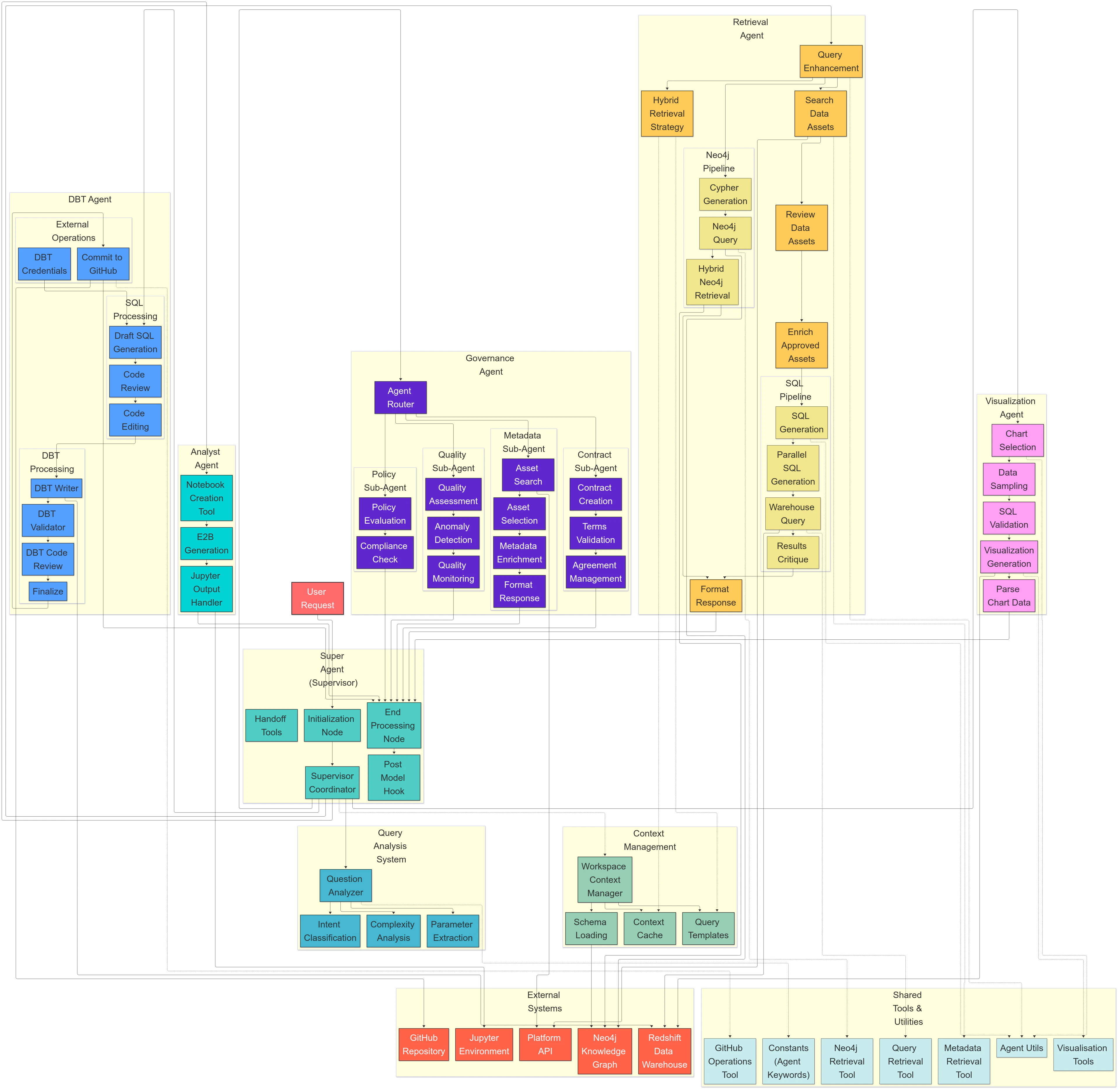 ## BrightAgent (Orchestrator)
The BrightAgent is the central coordinator. Every user query flows through it:
```mermaid theme={null}
graph TD
A[User Query] --> B[BrightAgent]
B --> C["Intent Classification"]
C --> D{"Route to Agent(s)"}
D --> E[Retrieval Agent]
D --> F[Analyst Agent]
D --> G[Visualization Agent]
D --> H[Engineering Agent]
D --> I[Governance Agent]
D --> J[Quality Agent]
D --> K[Metadata Agent]
E & F & G & H & I & J & K --> L[BrightAgent Aggregation]
L --> M["Synthesized Response"]
```
The BrightAgent:
1. **Analyzes intent** — Determines what the user is asking for and which capabilities are needed
2. **Routes to agents** — Selects one or more specialized agents based on the task
3. **Orchestrates workflows** — Coordinates multi-step execution where agents hand off results to each other
4. **Aggregates results** — Combines outputs from all agents into a coherent response
5. **Maintains conversation context** — Tracks state across multi-turn conversations so agents remember what came before
## Specialized Agents
Implements **GraphRAG** (Graph Retrieval Augmented Generation) for intelligent data discovery. Queries Neo4j to find relevant data assets, metadata, and relationships — then surfaces the best matches for the user's query.
Generates and executes **SQL queries** against Redshift. Performs statistical analysis, creates Jupyter notebooks, and produces insights grounded in actual data — not guesses from training data.
Generates **dbt transformation models** with proper SQL, configurations, and tests. Submits everything as a **GitHub PR** for human review — nothing gets deployed without approval.
Creates interactive **Plotly charts** and visualizations. Automatically selects chart types based on data characteristics — bar, line, scatter, pie, heatmap — or follows specific user instructions.
Manages **data quality policies**, compliance rules, and metadata governance. Tracks and maintains **lineage** across the entire data estate via Neo4j.
Runs **data quality checks** — completeness, accuracy, consistency, and freshness — and surfaces issues proactively. Operates as a background agent monitoring data health continuously.
Connects to **OpenMetadata via MCP** to generate descriptions, understand schemas, enrich catalog metadata with tags and documentation, and track data lineage.
Routes Slack messages to BrightAgent, Jira, Notion, Google Drive, and MS Teams via **intent classification** and MCP integrations. Sub-100ms routing latency.
## Data Flow
### How a Query Gets Answered
When a user asks a question, here's what happens end-to-end:
```mermaid theme={null}
graph TD
A["User: 'Show me a chart of sales by region'"] --> B[BrightAgent]
B -->|"Step 1: Classify intent"| C["Needs: retrieval + analysis + visualization"]
C -->|"Step 2: Retrieval"| D[Retrieval Agent]
D -->|"Query Neo4j"| E["Find 'sales' data assets + metadata"]
E -->|"Step 3: Analysis"| F[Analyst Agent]
F -->|"Generate SQL → Execute on Redshift"| G["Aggregate: sales by region"]
G -->|"Step 4: Visualization"| H[Visualization Agent]
H -->|"Generate Plotly chart"| I["Interactive bar chart"]
I -->|"Step 5: Synthesize"| J[BrightAgent]
J --> K["Natural language summary + chart + underlying data"]
```
### How Agents Access Data
Agents never access your data directly. Every query flows through the platform's secure infrastructure:
```mermaid theme={null}
graph LR
A[BrightAgent] --> B["Neo4j (Metadata)"]
A --> C["Platform API (GraphQL)"]
C --> D["Cross-Account IAM"]
D --> E["Redshift (Your Workspace)"]
E --> F["S3 (Your Organization)"]
```
* **Neo4j** provides metadata context — what data exists, where it lives, who owns it, how it relates to other data
* **Redshift** in your dedicated workspace executes queries via cross-account IAM roles
* **S3** in your organization account stores the actual data — Redshift reads it in place via Spectrum
Agents can only access data that the user's workspace is authorized for. No exceptions.
## Agent Coordination
### Parallel Execution
Multiple agents can work simultaneously when tasks are independent. For example, the Retrieval Agent searches for data while the Visualization Agent prepares chart templates — reducing total response time.
### Sequential Chaining
Workflows that depend on prior results run step-by-step: Retrieval finds data → Analyst queries it → Visualization charts the results. Each agent receives the output of the previous step.
### Context Sharing
Agents share relevant context and intermediate results through **LangGraph state**. The Analyst Agent knows exactly which data asset the Retrieval Agent found, including schema, location, and access details.
### Multi-Turn Conversations
The BrightAgent maintains **conversation state** across turns. Users can refine results iteratively:
* *"Show me customer data"* → Retrieval finds datasets
* *"Filter to California only"* → Analyst refines the query using context from the first turn
* *"Chart that as a pie chart"* → Visualization uses the analyst's results
## Human-in-the-Loop
Operations that modify your data infrastructure always require human approval:
| Operation | Approval Mechanism |
| -------------------------- | --------------------------------------------------------------------------- |
| dbt model generation | GitHub PR — your team reviews SQL, tests, and configurations before merging |
| Jupyter notebook execution | Code is presented for review before execution |
| Governance policy changes | Explicit user confirmation required |
| Schema modifications | User must approve before any changes are applied |
This ensures the AI assists your workflow without making irreversible changes autonomously.
## Observability
Every agent interaction is fully traceable:
Full trace visibility into every agent step — from intent classification through tool calls to response synthesis. Includes latency breakdowns, token usage, and error attribution.
Agent invocations, latency (p50/p95/p99), error rates, and token usage tracked via OpenTelemetry for operational dashboards and alerting.
All tool calls, data accessed, SQL generated, and decisions made are logged. Users can inspect exactly what happened behind every response.
Every response is scored for relevance and correctness using DeepEval metrics. Quality trends are tracked across releases to catch regressions early.
## Deployment
* **LangGraph Cloud** — BrightAgent is deployed on LangGraph Cloud for managed orchestration, scaling, and state persistence.
* **MCP Integration** — Model Context Protocol provides validated tool execution and external service connectivity (Jira, Notion, Google Drive, OpenMetadata).
* **LLM Providers** — Powered by OpenAI and Anthropic models, selected per-agent based on task requirements and cost efficiency.
* **Three Environments** — Dev, staging, and production with CI/CD pipelines and evaluation gates before promotion.
## Key Architectural Principles
| Principle | How It's Implemented |
| ------------------------- | ------------------------------------------------------------------------------------------------------------------------------------ |
| **Agent-per-Domain** | Each agent specializes in one data domain — retrieval, analysis, engineering, visualization — keeping logic focused and maintainable |
| **Graph-Powered Context** | Neo4j provides rich metadata context for every interaction — lineage, relationships, schema, ownership — via GraphRAG |
| **Secure by Default** | All data access flows through cross-account IAM roles. Agents can only reach data the user's workspace is authorized for |
| **Observable** | Every agent interaction, tool call, and decision is traced via LangSmith and logged for debugging and audit |
| **Human-in-the-Loop** | Irreversible operations require explicit human approval. AI assists — humans decide |
See the [evaluation framework](/brightagent/evaluation) for how agent quality is measured, or explore [integrations](/brightagent/integrations) to see what BrightAgent connects to.
## BrightAgent (Orchestrator)
The BrightAgent is the central coordinator. Every user query flows through it:
```mermaid theme={null}
graph TD
A[User Query] --> B[BrightAgent]
B --> C["Intent Classification"]
C --> D{"Route to Agent(s)"}
D --> E[Retrieval Agent]
D --> F[Analyst Agent]
D --> G[Visualization Agent]
D --> H[Engineering Agent]
D --> I[Governance Agent]
D --> J[Quality Agent]
D --> K[Metadata Agent]
E & F & G & H & I & J & K --> L[BrightAgent Aggregation]
L --> M["Synthesized Response"]
```
The BrightAgent:
1. **Analyzes intent** — Determines what the user is asking for and which capabilities are needed
2. **Routes to agents** — Selects one or more specialized agents based on the task
3. **Orchestrates workflows** — Coordinates multi-step execution where agents hand off results to each other
4. **Aggregates results** — Combines outputs from all agents into a coherent response
5. **Maintains conversation context** — Tracks state across multi-turn conversations so agents remember what came before
## Specialized Agents
Implements **GraphRAG** (Graph Retrieval Augmented Generation) for intelligent data discovery. Queries Neo4j to find relevant data assets, metadata, and relationships — then surfaces the best matches for the user's query.
Generates and executes **SQL queries** against Redshift. Performs statistical analysis, creates Jupyter notebooks, and produces insights grounded in actual data — not guesses from training data.
Generates **dbt transformation models** with proper SQL, configurations, and tests. Submits everything as a **GitHub PR** for human review — nothing gets deployed without approval.
Creates interactive **Plotly charts** and visualizations. Automatically selects chart types based on data characteristics — bar, line, scatter, pie, heatmap — or follows specific user instructions.
Manages **data quality policies**, compliance rules, and metadata governance. Tracks and maintains **lineage** across the entire data estate via Neo4j.
Runs **data quality checks** — completeness, accuracy, consistency, and freshness — and surfaces issues proactively. Operates as a background agent monitoring data health continuously.
Connects to **OpenMetadata via MCP** to generate descriptions, understand schemas, enrich catalog metadata with tags and documentation, and track data lineage.
Routes Slack messages to BrightAgent, Jira, Notion, Google Drive, and MS Teams via **intent classification** and MCP integrations. Sub-100ms routing latency.
## Data Flow
### How a Query Gets Answered
When a user asks a question, here's what happens end-to-end:
```mermaid theme={null}
graph TD
A["User: 'Show me a chart of sales by region'"] --> B[BrightAgent]
B -->|"Step 1: Classify intent"| C["Needs: retrieval + analysis + visualization"]
C -->|"Step 2: Retrieval"| D[Retrieval Agent]
D -->|"Query Neo4j"| E["Find 'sales' data assets + metadata"]
E -->|"Step 3: Analysis"| F[Analyst Agent]
F -->|"Generate SQL → Execute on Redshift"| G["Aggregate: sales by region"]
G -->|"Step 4: Visualization"| H[Visualization Agent]
H -->|"Generate Plotly chart"| I["Interactive bar chart"]
I -->|"Step 5: Synthesize"| J[BrightAgent]
J --> K["Natural language summary + chart + underlying data"]
```
### How Agents Access Data
Agents never access your data directly. Every query flows through the platform's secure infrastructure:
```mermaid theme={null}
graph LR
A[BrightAgent] --> B["Neo4j (Metadata)"]
A --> C["Platform API (GraphQL)"]
C --> D["Cross-Account IAM"]
D --> E["Redshift (Your Workspace)"]
E --> F["S3 (Your Organization)"]
```
* **Neo4j** provides metadata context — what data exists, where it lives, who owns it, how it relates to other data
* **Redshift** in your dedicated workspace executes queries via cross-account IAM roles
* **S3** in your organization account stores the actual data — Redshift reads it in place via Spectrum
Agents can only access data that the user's workspace is authorized for. No exceptions.
## Agent Coordination
### Parallel Execution
Multiple agents can work simultaneously when tasks are independent. For example, the Retrieval Agent searches for data while the Visualization Agent prepares chart templates — reducing total response time.
### Sequential Chaining
Workflows that depend on prior results run step-by-step: Retrieval finds data → Analyst queries it → Visualization charts the results. Each agent receives the output of the previous step.
### Context Sharing
Agents share relevant context and intermediate results through **LangGraph state**. The Analyst Agent knows exactly which data asset the Retrieval Agent found, including schema, location, and access details.
### Multi-Turn Conversations
The BrightAgent maintains **conversation state** across turns. Users can refine results iteratively:
* *"Show me customer data"* → Retrieval finds datasets
* *"Filter to California only"* → Analyst refines the query using context from the first turn
* *"Chart that as a pie chart"* → Visualization uses the analyst's results
## Human-in-the-Loop
Operations that modify your data infrastructure always require human approval:
| Operation | Approval Mechanism |
| -------------------------- | --------------------------------------------------------------------------- |
| dbt model generation | GitHub PR — your team reviews SQL, tests, and configurations before merging |
| Jupyter notebook execution | Code is presented for review before execution |
| Governance policy changes | Explicit user confirmation required |
| Schema modifications | User must approve before any changes are applied |
This ensures the AI assists your workflow without making irreversible changes autonomously.
## Observability
Every agent interaction is fully traceable:
Full trace visibility into every agent step — from intent classification through tool calls to response synthesis. Includes latency breakdowns, token usage, and error attribution.
Agent invocations, latency (p50/p95/p99), error rates, and token usage tracked via OpenTelemetry for operational dashboards and alerting.
All tool calls, data accessed, SQL generated, and decisions made are logged. Users can inspect exactly what happened behind every response.
Every response is scored for relevance and correctness using DeepEval metrics. Quality trends are tracked across releases to catch regressions early.
## Deployment
* **LangGraph Cloud** — BrightAgent is deployed on LangGraph Cloud for managed orchestration, scaling, and state persistence.
* **MCP Integration** — Model Context Protocol provides validated tool execution and external service connectivity (Jira, Notion, Google Drive, OpenMetadata).
* **LLM Providers** — Powered by OpenAI and Anthropic models, selected per-agent based on task requirements and cost efficiency.
* **Three Environments** — Dev, staging, and production with CI/CD pipelines and evaluation gates before promotion.
## Key Architectural Principles
| Principle | How It's Implemented |
| ------------------------- | ------------------------------------------------------------------------------------------------------------------------------------ |
| **Agent-per-Domain** | Each agent specializes in one data domain — retrieval, analysis, engineering, visualization — keeping logic focused and maintainable |
| **Graph-Powered Context** | Neo4j provides rich metadata context for every interaction — lineage, relationships, schema, ownership — via GraphRAG |
| **Secure by Default** | All data access flows through cross-account IAM roles. Agents can only reach data the user's workspace is authorized for |
| **Observable** | Every agent interaction, tool call, and decision is traced via LangSmith and logged for debugging and audit |
| **Human-in-the-Loop** | Irreversible operations require explicit human approval. AI assists — humans decide |
See the [evaluation framework](/brightagent/evaluation) for how agent quality is measured, or explore [integrations](/brightagent/integrations) to see what BrightAgent connects to.