> ## Documentation Index
> Fetch the complete documentation index at: https://docs.brighthive.io/llms.txt
> Use this file to discover all available pages before exploring further.
# BrightAgent Capabilities
> BrightAgent is your data team in a box — specialized AI agents that handle retrieval, analysis, engineering, visualization, governance, and more.
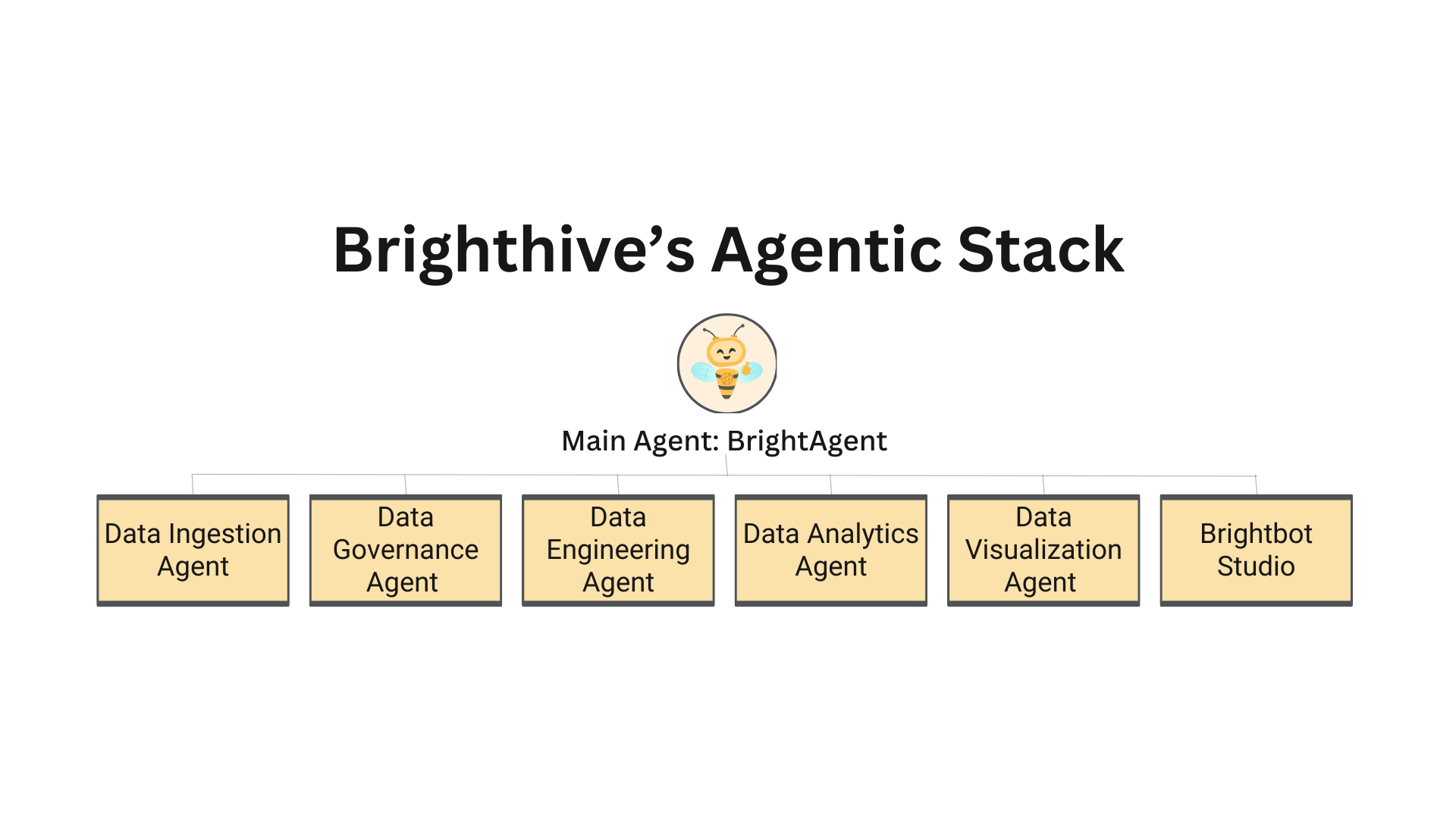 ## One Interface, Many Agents
You interact with one AI assistant. Behind the scenes, a **BrightAgent** orchestrates specialized agents to handle your request — analyzing intent, routing to the right experts, coordinating multi-step workflows, and synthesizing results into a clear response.
The BrightAgent doesn't just pick one agent per query. A question like *"show me a chart of sales by region"* triggers three agents in coordination: the Retrieval Agent finds the right data, the Analyst Agent queries and aggregates it, and the Visualization Agent produces the chart. You see one seamless answer.
## Specialized Agents
Finds and fetches data from your warehouse, data lake, and metadata catalog so you don't have to know where things live.
Queries your data, runs statistical analysis, and generates Jupyter notebooks with insights — all from a natural language question.
Generates dbt models for data transformation and submits them as GitHub PRs for your review before deployment.
Creates interactive charts and visualizations from your data — just describe what you want to see.
Tracks data quality, manages metadata, and maintains lineage across your data estate via Neo4j.
Validates data completeness, accuracy, and consistency — surfacing issues before they reach your reports.
Uses OpenMetadata to generate descriptions, understand schemas, enrich your catalog with tags and documentation, and track lineage.
Interact with BrightAgent directly from Slack — query data, manage Jira tickets, search Notion, and more.
## How Agents Collaborate
BrightAgent isn't a collection of isolated tools — agents coordinate to handle complex, multi-step tasks that span the entire data lifecycle.
### Multi-Agent Workflow Example
```mermaid theme={null}
graph TD
A["'Analyze customer churn and show me a chart'"] --> B[BrightAgent]
B --> C[Retrieval Agent]
C --> D["Searches Neo4j for customer data assets"]
D --> E[Analyst Agent]
E --> F["Generates & executes SQL in Redshift"]
F --> G[Visualization Agent]
G --> H["Produces interactive chart"]
H --> I[BrightAgent Synthesizes Response]
I --> J["Natural language summary + chart + data"]
```
### Coordination Patterns
Multiple agents work simultaneously when tasks are independent — data retrieval and visualization setup can run in parallel to reduce response time.
Some workflows require step-by-step execution: Retrieval first finds data, then Analysis queries it, then Visualization charts the results.
Agents share relevant context and intermediate results through shared state — the Analyst Agent knows exactly which data the Retrieval Agent found.
## What You Can Ask
BrightAgent handles the full range of data operations through natural language:
| What You Need | What Happens |
| ----------------------------------------------- | ------------------------------------------------------------------------------------------- |
| *"Find the customer dataset"* | Retrieval Agent searches Neo4j metadata, discovers matching data assets, presents options |
| *"Analyze sales trends by quarter"* | Retrieval finds data → Analyst generates SQL, executes query, produces statistical insights |
| *"Create a bar chart of revenue by region"* | Retrieval → Analyst → Visualization coordinate to produce an interactive Plotly chart |
| *"Build a dbt model for customer segmentation"* | Engineering Agent generates dbt SQL, configurations, and tests — submitted as a GitHub PR |
| *"Check data quality for the orders table"* | Quality Agent runs completeness, accuracy, consistency, and freshness checks |
| *"Who owns the marketing dataset?"* | Metadata Agent queries Neo4j for ownership, descriptions, and access information |
| *"Show me the lineage for this report"* | Governance Agent traces data lineage through Neo4j — from source to final output |
## Human-in-the-Loop
BrightAgent is designed so that AI assists your workflow without making irreversible changes autonomously:
* **dbt Models** — Generated transformation code is submitted as a GitHub PR. Your team reviews before merging.
* **Code Generation** — Jupyter notebooks and analysis scripts are presented for review before execution.
* **Governance Actions** — Changes to data policies and access controls require explicit user confirmation.
## Continuous Quality
Every agent interaction is evaluated in real-time for relevance, correctness, and goal accuracy. Quality metrics are tracked across all agents and fed back into continuous improvement.
Learn about the [evaluation framework](/brightagent/evaluation) that keeps BrightAgent reliable, or explore the [architecture](/brightagent/architecture) to understand how agents are built.
## One Interface, Many Agents
You interact with one AI assistant. Behind the scenes, a **BrightAgent** orchestrates specialized agents to handle your request — analyzing intent, routing to the right experts, coordinating multi-step workflows, and synthesizing results into a clear response.
The BrightAgent doesn't just pick one agent per query. A question like *"show me a chart of sales by region"* triggers three agents in coordination: the Retrieval Agent finds the right data, the Analyst Agent queries and aggregates it, and the Visualization Agent produces the chart. You see one seamless answer.
## Specialized Agents
Finds and fetches data from your warehouse, data lake, and metadata catalog so you don't have to know where things live.
Queries your data, runs statistical analysis, and generates Jupyter notebooks with insights — all from a natural language question.
Generates dbt models for data transformation and submits them as GitHub PRs for your review before deployment.
Creates interactive charts and visualizations from your data — just describe what you want to see.
Tracks data quality, manages metadata, and maintains lineage across your data estate via Neo4j.
Validates data completeness, accuracy, and consistency — surfacing issues before they reach your reports.
Uses OpenMetadata to generate descriptions, understand schemas, enrich your catalog with tags and documentation, and track lineage.
Interact with BrightAgent directly from Slack — query data, manage Jira tickets, search Notion, and more.
## How Agents Collaborate
BrightAgent isn't a collection of isolated tools — agents coordinate to handle complex, multi-step tasks that span the entire data lifecycle.
### Multi-Agent Workflow Example
```mermaid theme={null}
graph TD
A["'Analyze customer churn and show me a chart'"] --> B[BrightAgent]
B --> C[Retrieval Agent]
C --> D["Searches Neo4j for customer data assets"]
D --> E[Analyst Agent]
E --> F["Generates & executes SQL in Redshift"]
F --> G[Visualization Agent]
G --> H["Produces interactive chart"]
H --> I[BrightAgent Synthesizes Response]
I --> J["Natural language summary + chart + data"]
```
### Coordination Patterns
Multiple agents work simultaneously when tasks are independent — data retrieval and visualization setup can run in parallel to reduce response time.
Some workflows require step-by-step execution: Retrieval first finds data, then Analysis queries it, then Visualization charts the results.
Agents share relevant context and intermediate results through shared state — the Analyst Agent knows exactly which data the Retrieval Agent found.
## What You Can Ask
BrightAgent handles the full range of data operations through natural language:
| What You Need | What Happens |
| ----------------------------------------------- | ------------------------------------------------------------------------------------------- |
| *"Find the customer dataset"* | Retrieval Agent searches Neo4j metadata, discovers matching data assets, presents options |
| *"Analyze sales trends by quarter"* | Retrieval finds data → Analyst generates SQL, executes query, produces statistical insights |
| *"Create a bar chart of revenue by region"* | Retrieval → Analyst → Visualization coordinate to produce an interactive Plotly chart |
| *"Build a dbt model for customer segmentation"* | Engineering Agent generates dbt SQL, configurations, and tests — submitted as a GitHub PR |
| *"Check data quality for the orders table"* | Quality Agent runs completeness, accuracy, consistency, and freshness checks |
| *"Who owns the marketing dataset?"* | Metadata Agent queries Neo4j for ownership, descriptions, and access information |
| *"Show me the lineage for this report"* | Governance Agent traces data lineage through Neo4j — from source to final output |
## Human-in-the-Loop
BrightAgent is designed so that AI assists your workflow without making irreversible changes autonomously:
* **dbt Models** — Generated transformation code is submitted as a GitHub PR. Your team reviews before merging.
* **Code Generation** — Jupyter notebooks and analysis scripts are presented for review before execution.
* **Governance Actions** — Changes to data policies and access controls require explicit user confirmation.
## Continuous Quality
Every agent interaction is evaluated in real-time for relevance, correctness, and goal accuracy. Quality metrics are tracked across all agents and fed back into continuous improvement.
Learn about the [evaluation framework](/brightagent/evaluation) that keeps BrightAgent reliable, or explore the [architecture](/brightagent/architecture) to understand how agents are built.